The Nerd's Guide to Accountability - Treating Your Life Like a Software Project
Let’s face it: most self-improvement advice is too “soft” for us. Vision boards? Affirmations? Rigid habit trackers that make you feel guilty for missing a day?
No thanks.
As developers, we know how to build complex systems. We know how to manage chaos (mostly). We use tools like Git, CI/CD, and Code Reviews to keep our codebases healthy.
Why aren’t we using the same stack for our lives?
This is a guide to building an Automated Accountability System using the tools you already love: Markdown, Git, and LLMs.

Table of Contents
- The Stack
- Setting Up Your Dev Environment
- The Daily Spec: Writing Documentation for Your Future Self
- CI/CD for Life: The Objective System
- Querying Your Life: The Tasks Plugin
- The Secret Sauce: LLM Code Review
- Visualizing the Knowledge Graph
- Conclusion
1. The Stack
Forget Notion complexity or Todoist silos. We’re going with the “Unix Philosophy” approach: specialized tools, plain text, and pipeable outputs.
- Obsidian: The IDE for your life. (Any markdown editor works, but Obsidian has the plugins we need, and it’s awesome, and it’s free)
- Daily Notes: The
main()loop. - Obsidian Git: Auto-save and backup.
- Tasks: The query engine.
- Daily Notes: The
- Git: Version control. Because you will want to
git blameyourself for that missed workout. - LLMs: Your “Senior Engineer” for code reviewing your habits. Use Copilot, ChatGPT, Claude, or a local Llama. doesn’t matter.
2. Setting Up Your Dev Environment
Quick start (10 minutes):
- Download Obsidian and point it to a new folder (e.g.,
~/life-logs/) - Create a private GitHub repo for your notes (nobody needs to see your 3 AM thoughts)
- Install plugins: Settings → Community Plugins → Browse:
- Obsidian Git (auto-commits every 30min)
- Tasks (for querying)
- Enable Daily Notes: Settings → Core Plugins → Daily Notes (set folder to
/Daily/, template to/Daily/Template/Daily Note.md) - Create your template (see below) and you’re done
Git config tip: Set Obsidian Git to auto-pull on startup and auto-push on close. Your notes are now backed up and versioned. git log = your life log.
Mobile Access
You want to commit from the gym? You have two options:
- GitHub Mobile: The lightweight client. Great for quick edits or checking off boxes. You lose the Obsidian plugins but it works out of the box with your repo.
- Obsidian Mobile: The full IDE in your pocket. It supports plugins, but aligning the git sync on iOS/Android requires some extra config (e.g., Working Copy on iOS or Git plugin setup on Android).
3. The Daily Spec: Writing Documentation for Your Future Self
Don’t just “journal.” Write a specification for your day.
Your daily note is a commit message. It captures the state of the system at a point in time.
The Template (/Daily/Template/Daily Note.md)
Keep it simple. Complexity is the enemy of execution.
# 📅
## Daily Check-ins (The "Unit Tests")
- [ ] 💻 **Deep Work / Flow** (2h+) #daily ->
- [ ] 🚀 **Side Project Commit** #daily ->
- [ ] 📚 **Tech Learning / Reading** #daily ->
- [ ] 🏃♂️ **Debug Body** (Workout/Move) #daily ->
- [ ] 🥗 **Refuel** (Clean Eating) #daily ->
## Log
> What actually happened? (Exceptions, stack traces, and wins)
This template will be replicated for all your daily notes, created automatically day-by-day.
Why this works:
- #tags: acts like metadata you can query later.
- Checkboxes: binary pass/fail status. Simple, effective.
- ”->”: The implementation detail. Why did it fail? What did you ship?
- Auto-save: All the progress is automatically saved and pushed to your private git repo.
- Pretty awesome interface that you can customize as you wish with the thousands of themes available.
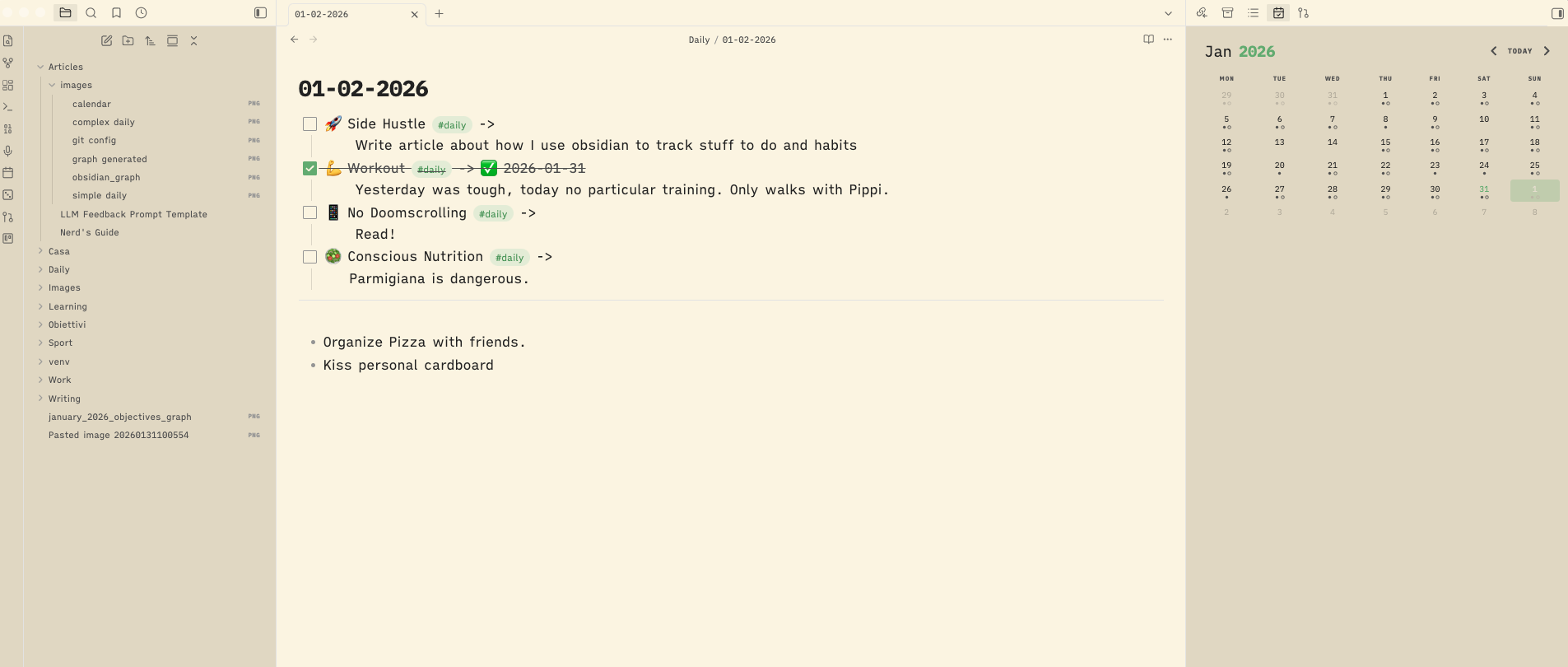
Your Daily Workflow: The Main Loop
Here’s how it actually runs in production:
- Morning (7 AM): Open Obsidian. Today’s note is already there (Daily Notes plugin). Start fresh.
- Throughout the day: Check boxes as you complete them. Add
-> detailsafter each (e.g.,-> 3h on API redesign). - Evening (Before bed): Fill the “Log” section. Two sentences max. What worked? What crashed?
- Sunday (Weekly standup): Run your review prompt (see Section 6).
- Sunday +1: Adjust next week’s approach based on LLM feedback. Ship the patch.
That’s it. No app-switching. No syncing issues. Just text files and Git commits.
4. CI/CD for Life: The Objective System
You don’t just write code; you ship releases. Treat your goals the same way.
The Objective File (/Objectives/2026 Goals.md)
# 🎯 Release Plan 2026

## Q1 Milestones (Jan - Mar)
### Epic 1: Ship "Project X" 🚀
**Status:** In Progress
**Definition of Done:**
- [ ] MVP deployed to Vercel #feature
- [ ] First 10 users onboarded #feature

### Epic 2: System Upgrade (Health) 💪
**Status:** Ongoing
**Definition of Done:**
- [ ] 3 gym sessions/week average #feature
- [ ] Sleep score > 80 average #feature
The “Standup” (Weekly Review)
Every Sunday, review your week.
- Did you hit your “Deep Work” targets?
- Are you blocked on “Project X”?
- Do you need to refactor your routine?
5. Querying Your Life: The Tasks Plugin
Obsidian Tasks allows you to run SQL-like queries on your markdown files.
The “Bug Tracker” Dashboard:
Create a file called Tasks Dashboard.md:
## 🐛 Bugs (Urgent Stuff)
```tasks
not done
tag includes #bug
sort by priority
## 🚀 Features (Side Project)
```tasks
not done
tag includes #feature
sort by created
Now you have a dynamic view of your backlog, right in your IDE… er, notes app. Examples in here.
6. The Secret Sauce: LLM Code Review
This is where it gets crazy good.
Tracking data is useless if you don’t analyze it. But analyzing your own data is biased. You need an external, objective code reviewer.
How to Feed the Data
Since your life is now just a folder of Markdown files (.md), you can treat it like a codebase. Open your vault in VS Code / Cursor / Antigravity, and use their AI chat features to read your files directly. You should feed your “Objectives” and the daily notes you want to analyze.
An Example Prompt
“Act as an Objective Mentor reviewing your pupil activity logs. Check the last 30 days in my daily notes folder. Output:
- Pattern Recognition: What loops am I stuck in? (e.g., ‘Tutorial Hell’, ‘Bikeshedding on setup’)
- Refactoring Suggestions: What habits should be deprecated?
- Brutal Honesty: Don’t sugarcoat. If I’m procrastinating, call it out.”
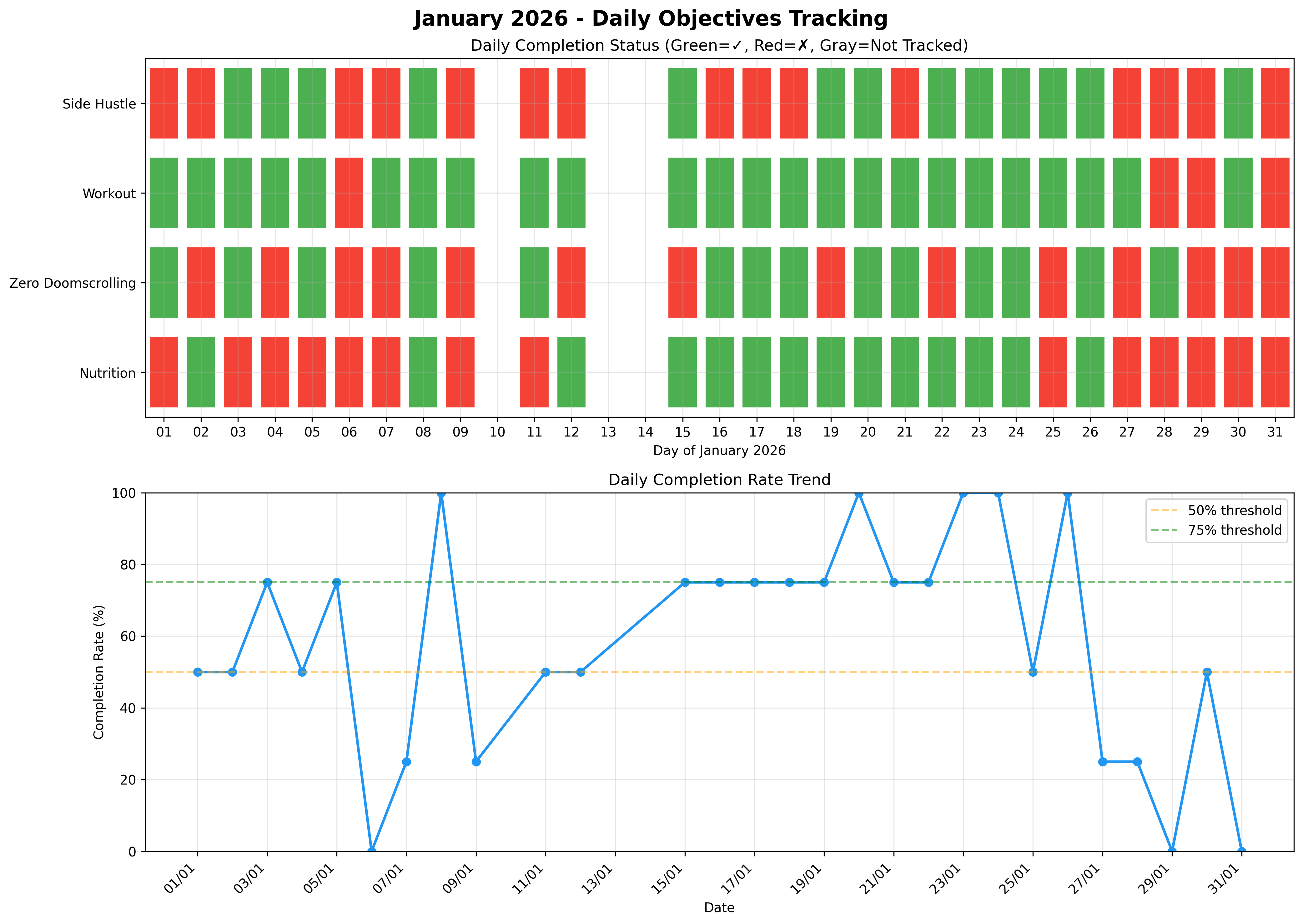
Visualizing the Output
You can ask the LLM to generate data for a graph.
“Based on these notes, generate a chart with Python showing my consistency over time.”
7. Visualizing the Knowledge Graph
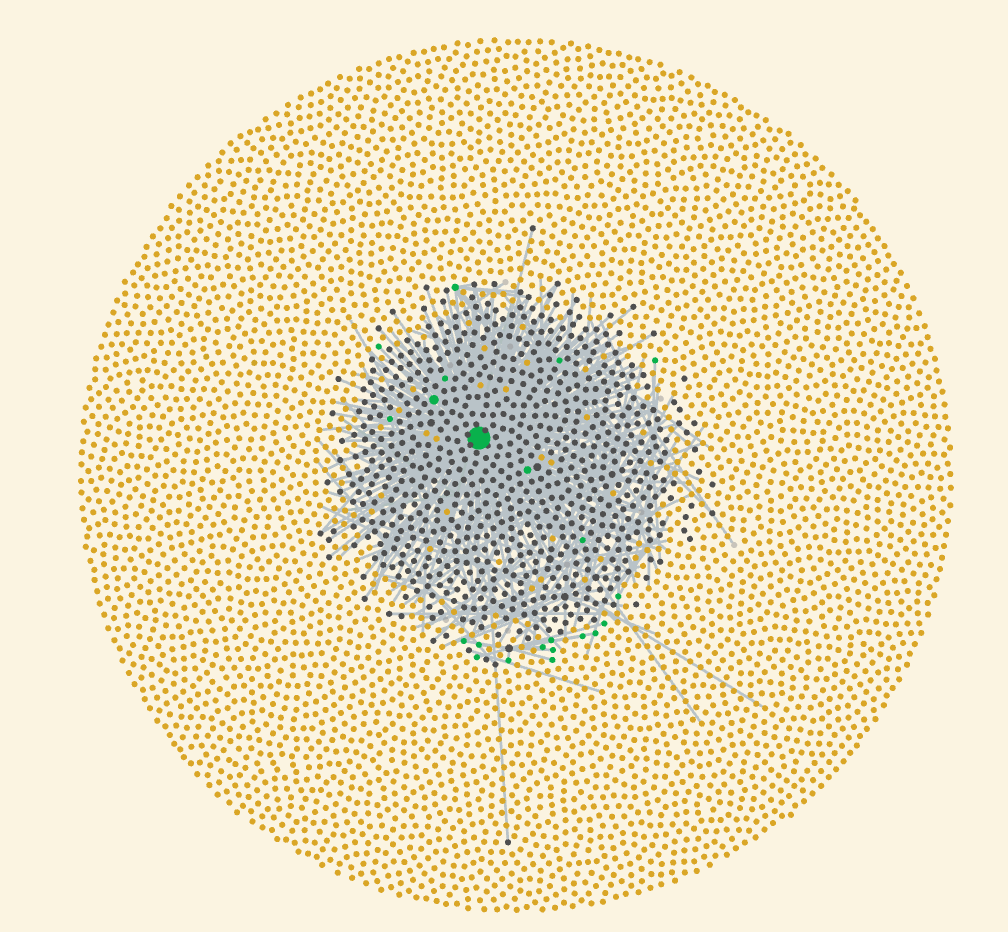
This is the Graph View. It visualizes your second brain.
- Nodes are files.
- Edges are links (
[[...]]).
Over time, you see clusters forming. Your “Daily Notes” cluster around “Projects,” which cluster around “Technologies” you’re learning. How cool is this?
8. Conclusion
You wouldn’t ship code without tests, version control, or a review process. Stop running your life on prod without them.
The “Nerd Way” isn’t about complexity. It’s about:
- Visibility: Plain text means no hidden data.
- Version Control: Git means you can always
revert. - Automation: LLMs mean you have a 24/7 coach.
Commit often. Refactor your habits. Ship your life.