Sub-Agent Orchestration with Spring AI
Sub-agent orchestration is a powerful pattern for building modular AI systems.
Instead of a single monolithic prompt, you delegate specialized tasks to purpose-built agents—each optimized for its role.

The Pattern
An Orchestrator coordinates the workflow, deciding which specialized agents to invoke based on task requirements. Each Sub-agent operates in isolation with its own context, system prompt, and potentially different models.
Why this wins:
- Modularity: Each agent has a single responsibility
- Cost Optimization: Use expensive models only where needed
- Context Isolation: Sub-agents don’t inherit bloated conversation history
- Flexibility: Easy to add, modify, or swap agents
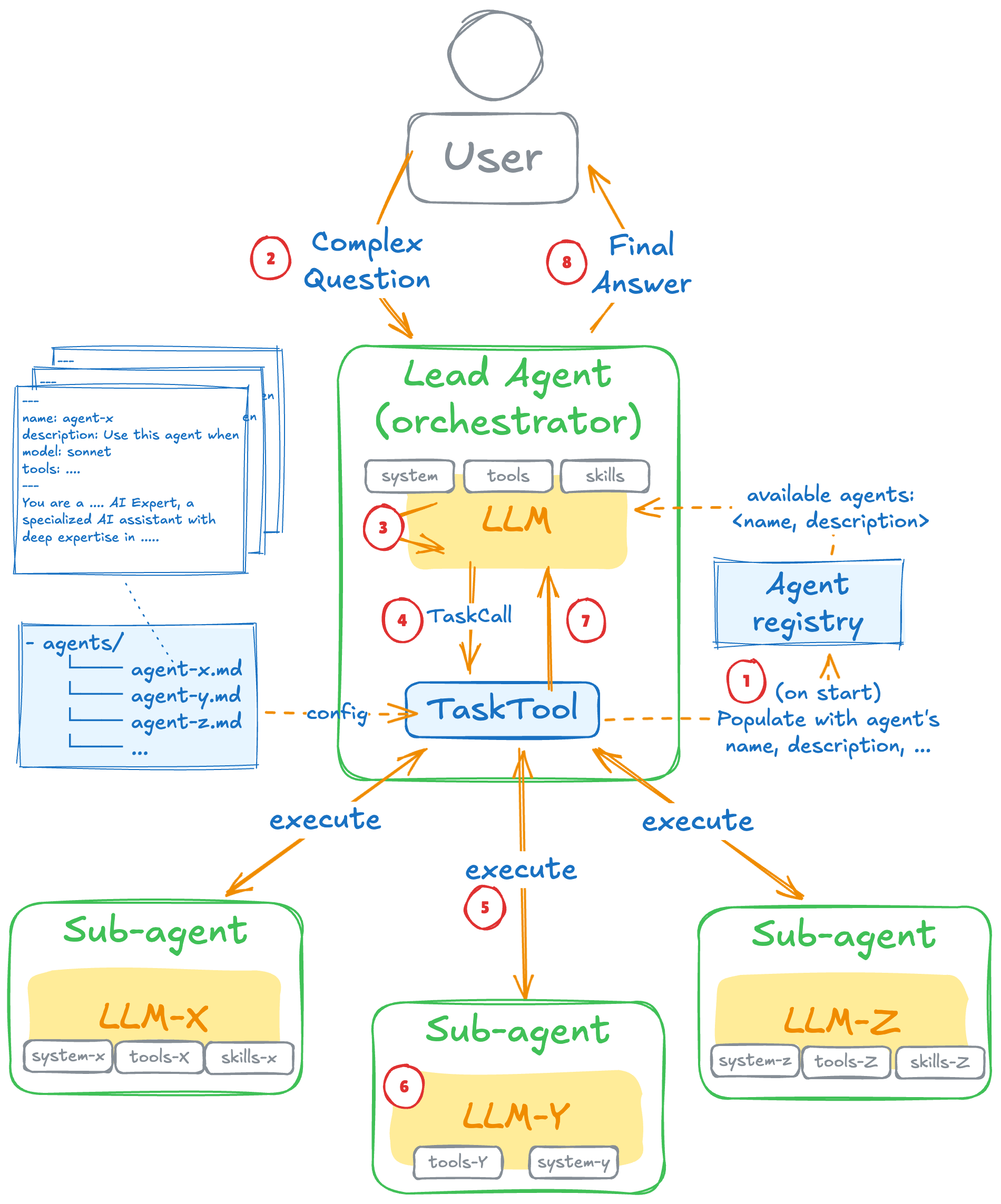
In this article we’ll implement sub-agent orchestration using spring-ai-agent-utils, with the Architect-Builder pattern as our example.
Example: The Architect-Builder Pattern
One powerful sub-agent configuration is the Architect-Builder pattern:
- Architect (expensive reasoning model): Analyzes data, extracts facts, creates structured blueprints
- Builder (cheap fast model): Generates polished prose from the blueprint
The Architect cannot hallucinate because it only outputs structured data. The Builder cannot hallucinate because it’s locked into the Architect’s blueprint.
Cost Analysis
Assume a task requiring 2000 reasoning tokens and 1500 output tokens:
| Approach | Model | Input | Output | Cost |
|---|---|---|---|---|
| Single Call | o3-mini | 500 | 3500 | $0.077 |
| Architect | o3-mini | 500 | 500 | $0.022 |
| Builder | gpt-4o-mini | 600 | 1500 | $0.001 |
| Total | — | — | — | $0.023 |
70% savings by moving generation work to the cheap model.
How Sub-Agent Calling Works
The Task Tool
When Spring AI starts, TaskTool loads agent definitions (markdown files) and builds an Agent Registry. This registry is injected into the orchestrator’s context as a tool:
{
  "name": "Task",
  "description": "Launch a specialized agent. Available agents:
    - architect: Strategic reasoning agent
    - builder: High-speed content generation",
  "parameters": {
    "subagent_type": "string (required)",
    "prompt": "string (required)"
  }
}
Delegation Flow
When the orchestrator decides to delegate, it responds with a tool call request:
{
  "tool_calls": [{
    "name": "Task",
    "arguments": {
      "subagent_type": "architect",
      "prompt": "Analyze the differences between these articles..."
    }
  }]
}
Spring AI intercepts this, spawns the sub-agent with a fresh, isolated context, executes it, and returns the result.
Context Isolation
Each sub-agent operates in its own isolated context window:
- Receives only its system prompt + the task prompt
- Does not see the orchestrator’s conversation history
- Can use a different LLM than the orchestrator
This prevents context pollution and enables multi-model routing.
Response Flow
Orchestrator                    TaskTool                      Sub-agent
     |                              |                               |
     |-- tool_call(architect) ----->|                               |
     |                              |-- spawn with fresh context -->|
     |                              |                               |
     |                              |<----- Response ---------------|
     |<-- tool_response ------------|
     |
     |-- tool_call(builder) ------->|
     |                              |-- spawn Builder ------------->|
     |<-- tool_response ------------|<----- Response ---------------|
     |
     |-- final response to user
Implementation
Agent Definitions
Agents are defined as markdown files with YAML frontmatter:
architect.md
name: architect
description: Use for complex analysis requiring deep reasoning
model: o3-mini
---
You are the Architect - a strategic reasoning agent.
Analyze input data and produce a structured Blueprint.
DO NOT write the final response.
builder.md
---
name: builder
description: Generate polished final content from a blueprint
model: gpt-4o-mini
---
You are the Builder - a high-speed execution engine.
WORK ONLY from the provided Blueprint.
DO NOT add outside information.
Configuration
@Configuration
public class AgentConfig {

    @Value("${agent.tasks.paths}")
    private List<Resource> agentPaths;

    @Bean("orchestratorClient")
    ChatClient orchestratorClient(ChatClient.Builder chatClientBuilder) {

        SubagentType claudeType = ClaudeSubagentType.builder()
                .chatClientBuilder("default", chatClientBuilder.clone())
                .build();

        var taskTools = TaskTool.builder()
                .subagentReferences(ClaudeSubagentReferences.fromResources(agentPaths))
                .subagentTypes(claudeType)
                .build();

        return chatClientBuilder.clone()
                .defaultToolCallbacks(taskTools)
                .defaultAdvisors(
                        ToolCallAdvisor.builder()
                                .conversationHistoryEnabled(true)
                                .build())
                .build();
    }
}
In application.yaml:
spring:
  ai:
    openai:
      api-key: ${OPENAI_API_KEY}
      chat:
        options:
          model: gpt-4o-mini

agent:
  tasks:
    paths: classpath:/agents/*.md
The Service
The orchestrator prompt describes available agents but lets the LLM decide which to use:
@Service
public class SubagentService {

    private final ChatClient orchestratorClient;

    public SubagentService(@Qualifier("orchestratorClient") ChatClient orchestratorClient) {
        this.orchestratorClient = orchestratorClient;
    }

    public String process(String task, String data) {
        String prompt = """
                You are a task orchestrator with access to specialized agents via the Task tool.

                Available agents:
                - architect: Use for complex analysis requiring deep reasoning
                - builder: Use to generate polished final content

                Guidelines:
                - For complex tasks: Use architect first, then builder
                - For simple tasks: Use builder directly or respond yourself
                - Always return the final response to the user.

                Task: %s
                Data: %s
                """.formatted(task, data);

        return orchestratorClient.prompt(prompt).call().content();
    }
}
Trade-offs: Orchestration vs Direct Calls
Token Overhead
Orchestration adds overhead from TaskTool descriptions and conversation history:
| Approach | Total Input Tokens | Total Output Tokens |
|---|---|---|
| With Orchestrator | ~21,000 | ~1,700 |
| Direct Calls | ~1,300 | ~800 |
When to Use Each
Use Orchestration when:
- Dynamic workflows where the LLM decides which agents to call
- User-facing chat interfaces
- Multi-step tasks with branching logic
Use Direct Calls when:
- Fixed pipelines (architect → builder is always the same)
- Maximum token efficiency is critical
- Predictable, deterministic workflows
For direct calls:
public String processDirect(String task, String data) {
    String blueprint = architectClient.prompt(task + "\n" + data).call().content();
    return builderClient.prompt(blueprint).call().content();
}
When to Use Sub-Agent Patterns
Good fit:
- Tasks requiring multiple specialized skills
- Cost optimization by model routing
- Complex workflows with conditional logic
Skip it when:
- Simple single-purpose tasks
- Minimal output generation
- Latency is critical (sub-agent calls add round trips)
Repository
Full implementation: https://github.com/GaetanoPiazzolla/llm-architect-builder
Interested in seeing this in action? Check out BullSentiment.com for real-time stock sentiment analysis powered by sub-agent orchestration.