You want to use a local coding agent to build software
In this article we’ll see how to install and run everything needed to use LLMs completely offline and free of charge.
The only requirement is to have pretty decent hardware to do so. In fact, this guide is for Apple Silicon. Budget 24 GB of unified memory as the floor, 32 GB+ to be comfortable. On a discrete GPU the concepts still hold but the numbers don’t.
On our extremely pricey machines ( :D ) will play with three components:
Aren’t you curious to see how an Open Weight model compares to LLMs available with expensive subscriptions? Is it true that it can match Claude Sonnet in some aspects? Then follow through.
Spoiler: it doesn’t. But…

1. Install the Tooling
OpenCode Agent
The OpenCode agent orchestrates the work to enable complex work streams. (It’s Similar to Antigravity or Claude Code, but free). It’s probably it’s the best OS coding agent at the moment.
curl -fsSL https://opencode.ai/install | bash
source ~/.zshrc # or ~/.bashrc
opencode        # to test it
LLama.cpp Runtime
It’s the defacto-standard engine to run inference with minimal configs on a wide range of hardware:
brew install llama.cpp
HuggingFace CLI
We will use hf to download open weight models:
brew install hf
2. Time to Pick your model
2.1 Why Qwen3.6
This guide uses Qwen3.6-35B-A3B as the default model. The choice isn’t arbitrary — it’s the best trade-off available for local agentic coding on consumer hardware. (Spoiler alert: we will probably update this guide to Qwen3.8 soon.)
In short it’s fast, it’s memory efficient and it’s ready to use. If you want to know why, read on — §2.2 builds the reasoning one step at a time.
Otherwise, skip to §2.4, open the calculator, and download what it marks.
| Term | What it is |
|---|---|
| MoE (Mixture of Experts) | Architecture where each token routes through only a subset of the model’s “expert” layers |
| KV cache (Key-Value cache) | Memory stored per token seen so far; grows linearly with context, main memory pressure point |
| Quant (quantization) | Reducing weight precision from 16-bit floats to fewer bits (Q4 = 4-bit, Q8 = 8-bit); lower quant = smaller file, lower quality |
| GGUF (GGML Universal Format) | llama.cpp’s binary format storing quantized weights, KV metadata, and tokenizer in one file |
Three things make it the right default.
- It’s fast for its size. An MoE reads only a fraction of itself per token. §2.2 turns that into your choice of model.
- Its context is cheap. A hybrid attention design keeps the KV cache small. §2.2 turns that into your choice of quant.
- It’s ready to be an agent. Proper tool schemas, the function-calling protocol OpenCode expects, and production GGUF builds from Unsloth — no prompt hacks needed to get tool use working, which is not true of every open model.
What it isn’t. It won’t beat Opus on deep multi-file reasoning. It falls off on tasks requiring cross-module architectural judgment. For the ~70–80% of coding work that is well-scoped (feature additions, bug fixes, refactors, tests) it’s Sonnet-class. The rest gets routed to a stronger model or a human.
Alternatives that fit similar hardware: Llama 3.1 8B (faster, weaker), Qwen2.5-Coder-32B (similar size, code-tuned), Mistral Small 24B (strong reasoning, no MoE).
2.2 Which version of Qwen 3.6?
Unsloth publishes a dozen builds of this model, from 11 GiB to 36 GiB. Two questions decide which to download. Take them in order — the first is settled by the architecture, the second by your machine.
Sizes below are GiB, matching About This Mac and ls -lh; only bandwidth is decimal GB/s.
Question 1 — will it be fast enough?
Every token, the runtime reads weights out of memory. Speed is set by how many bytes it reads, not by how big the file is. A dense model reads all of them; an MoE routes each token through a few experts and reads only those.
Which inverts the intuition — here the bigger file is the faster model:
| file | read per token | ~tok/s @150 GB/s (Pro) | @400 GB/s (Max) | |
|---|---|---|---|---|
35B-A3B UD-Q4_K_S |
19.9 | ~4.0 GB — a fifth of it | ~28 | ~75 |
27B dense UD-Q5_K_XL |
18.7 | 20.0 GB — all of it | ~6 | ~15 |
Same footprint, 5× the throughput. So this question is settled before you even look at your own machine: on anything laptop-class, take the MoE. The dense 27B only makes sense on an Ultra, where bandwidth stops being the binding constraint.
What it doesn’t settle is which of the dozen quants. That’s a question about space.
Question 2 — will it fit?
Not in your RAM — in your budget, which is smaller. macOS caps GPU allocation at ~75% of unified memory, so a 36 GB Mac gives you 27 GiB to work with. Raisable, but not across reboots:
sudo sysctl iogpu.wired_limit_mb=30000
Three things compete for that 27 GiB: the weights, the KV cache, and about 1.5 GiB of compute buffers. Weights you read off the download page; buffers are near enough a constant. The KV cache is the term people get wrong — it grows with every token of context, and on a conventional model it grows fast enough to push you down a quant level just to make room.
Not here. Qwen3.6 is hybrid: only 1 layer in 4 does full attention
(full_attention_interval: 4), and the other three store nothing that grows.
| full-attn layers | KV heads | per token | at 64k | |
|---|---|---|---|---|
| 35B-A3B | 10 of 40 | 2 | 20 KiB | 1.25 |
| 27B dense | 16 of 64 | 4 | 64 KiB | 4.0 |
So 64k of context costs 1.25 GiB instead of the 4+ you’d have to budget elsewhere — and there’s no reason to quantize a cache that small. Long conversations don’t cost you a quant level.
That’s all three terms. Now they just get added up.
2.3 Putting it together
Nothing new here — this is the three things you just read, summed:
total = weights + KV + 1.5          KV = KV_per_token × context × slots
fits if total ≤ 0.75 × RAM
A 36 GB Mac running UD-Q4_K_S at 64k across 2 slots:
  19.92   weights
+  2.50   KV        (1.25 × 2 slots)
+  1.50   buffers
= 23.92   GiB       vs a 27 GiB ceiling  →  89%
Stay under ~90%. Landing on the ceiling works until the first time two agents run at once.
2.4 Your answer
Open the hardware & model calculator.
It detects your chip where the browser allows, you set memory, context and slots, and it applies the formula above to every published quant — from the same byte counts pulled off HuggingFace. One row is marked download this: the largest quant that stays at or under 90% of your budget and still runs at a usable speed. That’s the answer; the rest of the table shows what you give up on either side of it.
slots = concurrent agents (see §4); two is a sensible default, one if you never
delegate. Both context and slots move the recommendation, which is why this is a
tool and not a table.
Three judgements it can’t make for you:
Below ~Q3, tool calling degrades — and tool calling is what makes or breaks an agent. If you’re choosing between a higher quant and more context, take the quant; 64k is enough with compaction on.
Slack has value the percentage doesn’t show. The rule targets 90% because quality rises with quant. If you routinely run more agents than you’ve provisioned slots for, or keep other heavy apps open, drop one quant level and buy the headroom instead.
If you’re a few GiB over, raise the wired limit first (§2.2). Failing that,
--n-cpu-moe N keeps the N least-used expert layers outside the GPU allocation
rather than dropping -ngl — it costs throughput, but far less than offloading
attention layers would.
At 96 GB and above the budget stops binding: spend it on more slots, more context, or a second model co-hosted for the reviewer role (§4).
2.5 Download
Set these once, then the rest of the doc uses them:
export LLM_QUANT=UD-Q4_K_S           # whatever §2.4 marked "download this"
export LLM_DIR=~/models/qwen36
export LLM_MODEL=$LLM_DIR/Qwen3.6-35B-A3B-$LLM_QUANT.gguf
hf download unsloth/Qwen3.6-35B-A3B-MTP-GGUF \
  --include "Qwen3.6-35B-A3B-$LLM_QUANT.gguf" --local-dir $LLM_DIR
The -MTP- repo bundles the multi-token-prediction heads used for
self-speculative decoding — no separate draft model needed.
The chat template — do not skip this.
hf download froggeric/Qwen-Fixed-Chat-Templates \
  --include "chat_template.jinja" --local-dir ~/models/templates
One file covers all Qwen3.5/3.6 variants. Qwen’s official template has bugs that
bite specifically in agentic use — its README lists KV-cache invalidation, token
waste, and “fatal agentic stalling”. The symptom you’d otherwise hit is the model
emitting <tool_call>…</tool_call> as plain text that the harness can’t parse, so
the agent silently stops. It also adds:
<|think_on|>/<|think_off|>in any prompt toggles reasoning; the tag is stripped before the model sees it.- A
consecutive_failurescounter that breaks reasoning spirals after repeated failed tool calls instead of letting the model loop.
3. Run it
3.1 The launch command
llama-server \
  -m $LLM_MODEL \
  --alias qwen3.6-35b-a3b \
  --host 127.0.0.1 --port 8080 \
  -c 131072 -np 2 \
  -ngl 999 -fa on \
  -b 2048 -ub 512 --load-mode none \
  --jinja --chat-template-file ~/models/templates/chat_template.jinja \
  --reasoning-preserve \
  --temp 0.4 --top-p 0.95 --top-k 20 --min-p 0 \
  --presence-penalty 0 --repeat-penalty 1.0 \
  --spec-type draft-mtp --spec-draft-n-max 2
| flag | why this value |
|---|---|
--alias qwen3.6-35b-a3b |
Must equal the model key in opencode.json. It’s also the id OpenCode string-matches to select a built-in system prompt — an alias containing gpt or claude would silently load the wrong one. |
-c 131072 -np 2 |
-np is parallel slots; -c is divided across them, giving 65536 each. Two slots lets the orchestrator and one subagent run concurrently, for 2.5 GiB of KV. Use -c 65536 -np 1 if you don’t delegate. Whatever you choose, per-slot size must equal limit.context in opencode.json. |
-ngl 999 |
All layers on the GPU. Any layer left on CPU tanks throughput. |
-fa on |
Flash attention. Accepts on\|off\|auto; pin it rather than leaving it to detection. |
-b 2048 -ub 512 |
Batch / micro-batch for prefill. Bigger helps, but a large -ub inflates the compute buffer. Raise -ub to 1024–2048 if you have memory headroom and want faster prefill. |
--load-mode none |
No mmap, no mlock: weights read straight into memory, avoiding page-fault stalls mid-generation at the cost of a slower first load. Replaces --no-mmap, now deprecated. --load-mode mmap+mlock gives a faster load that still resists pageouts. |
--jinja --chat-template-file |
The single most important reliability flag. Without it, unparseable tool calls. See §2.5. |
--reasoning-preserve |
Keeps past <think> blocks in history, not just the last. The server suggests this when the template supports it; per the template author it prevents “amnesia stalls” in long loops and gives a 100% prefix-cache hit rate. Costs context — drop it if you compact constantly. |
--temp 0.4 --top-p 0.95 --top-k 20 --min-p 0 |
Qwen’s published default is 0.6; 0.4 tests better for code. Don’t reuse these for other model families — Gemma wants higher. |
--presence-penalty 0 --repeat-penalty 1.0 |
Off, deliberately. Repetition penalties corrupt code, which is legitimately repetitive. |
--spec-type draft-mtp --spec-draft-n-max 2 |
Self-speculative decoding via the model’s MTP heads — roughly doubles tok/s. Depth 2 is Unsloth’s recommendation; several reports tie depth 3–4 to broken tool calls. Drop to 1, or remove both flags, if tool calling misbehaves. |
3.2 Point OpenCode at it
OpenCode reads its config from the directory you launch it in, so this belongs in your project — not in your home directory:
./opencode.json
{
  "$schema": "https://opencode.ai/config.json",

  "provider": {
    "llamacpp": {
      "npm": "@ai-sdk/openai-compatible",
      "name": "llama-server (local)",
      "options": {
        "baseURL": "http://127.0.0.1:8080/v1"
      },
      "models": {
        "qwen3.6-35b-a3b": {
          "name": "Qwen3.6 35B-A3B (UD-Q4_K_S)",
          "tool_call": true,
          "reasoning": true,
          "limit": {
            "context": 65536,
            "output": 8192
          }
        }
      }
    }
  },

  "model": "llamacpp/qwen3.6-35b-a3b",
  "small_model": "llamacpp/qwen3.6-35b-a3b",
  "default_agent": "build",

  "compaction": {
    "auto": true,
    "prune": true
  }
}
IMPORTANT: The model key (qwen3.6-35b-a3b) has to match the model you picked. Other than that, the one field to keep in sync is limit.context, which must
equal your per-slot size:
"limit": { "context": 65536, "output": 8192 }
After this you just need to run: $ opencode and if everything was configured correctly, we should see our brand new homepage:
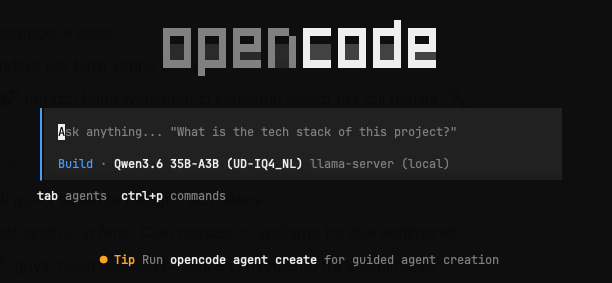
If it doesn’t show up with the correct Qwen model configured, in order:
- Are you in the project directory? The provider is declared in
./opencode.jsonand is invisible elsewhere. Check withopencode models | grep llamacpp. - Is the server up?
curl -s 127.0.0.1:8080/v1/models - Does the id it reports match the model key in
opencode.json? It’s set by--alias, and the two must be identical.
4. Multi-agent split
Why bother, when every agent here runs the same weights?
Context hygiene. A local model degrades fast as its window fills with irrelevant detail, and one agent doing everything fills it with exactly that — directory listings, abandoned attempts, the reasoning behind a decision three steps back. Split the work and each agent gets a clean window and a single job: the orchestrator never sees the mechanics of an edit, and the reviewer never sees the argument for it.
Open the /.opencode.json and add:
{
  // -- previous config

  "default_agent": "build",

  "agent": {
    "build": {
      "mode": "primary",
      "description": "Orchestrator. Decomposes work and delegates to subagents.",
      "temperature": 0.4,
      "top_p": 0.95,
      "steps": 60
    },

    "plan": {
      "mode": "primary",
      "description": "Read-only planning. Point this at a stronger model when you have one.",
      "temperature": 0.4,
      "top_p": 0.95
    },

    "implement": {
      "mode": "subagent",
      "description": "Implements ONE narrow, fully-specified change in a named set of files. Give it the exact files and the exact change; it will not plan or expand scope. Use one per independent change so each gets a clean context.",
      "temperature": 0.4,
      "top_p": 0.95,
      "steps": 40,
      "prompt": "{file:./.opencode/prompts/implement.md}"
    },

    "review": {
      "mode": "subagent",
      "description": "Reviews a change for correctness against its acceptance criteria and re-runs the tests. Read-only, cannot edit. Use after implement, and before telling the user something works.",
      "temperature": 0.3,
      "top_p": 0.95,
      "steps": 25,
      "permission": {
        "edit": "deny"
      },
      "prompt": "{file:./.opencode/prompts/review.md}"
    }
  }
}
Finally, create a prompts folder inside the .opencode directory and create two files named ,
copying the value in the gist.
That gives you two primary agents plus two subagents:
| agent | mode | role |
|---|---|---|
build |
primary | Orchestrator. Decomposes the task, delegates, integrates. |
plan |
primary | Read-only planning. Repoint at a stronger model when you have one. |
implement |
subagent | One narrow, fully-specified change. Won’t plan or expand scope. |
review |
subagent | Read-only correctness check; re-runs the tests. Cannot edit. |
You can switch between build and plan by shift+tab, and you can invoke subagets with @implement / @review, or let build delegate on its own.
Subagent nesting is capped at depth 1 by default, so subagents can’t spawn subagents.
Each concurrent subagent needs its own slot: -np 2 supports the orchestrator
plus one subagent. Slots are cheap here (1.25 GiB of KV each at 64k), but they
divide -c, so scale both together — -np 4 needs -c 262144 for the same 64k
each.
5. Is it worth it? Testing + Conclusion
Qwen-in-OpenCode vs Sonnet-in-Claude-Code
I’ve run the inference on a Real production Project, the one I’m currently working full-time at Strategy in Action.
Thank God we didn’t locked-in with Claude-Code at all. All our @CLAUDE.md files exist alongside @AGENTS.md, so OpenCode is able to read them and get the context very fast. I also have a plugin that does exactly that https://github.com/GaetanoPiazzolla/claude-code-agents-md
I don’t have the time to run a full evaluation suite (I don’t want to), so the heuristic I’ve followed for this evaluation is:
“I’ll open my Jira board and find something suitable, and try to fix it with claude /model sonnet and with OpenCode /model Qwen3.6 and compare the results”.
I’ve done this with a couple of tasks.
1) One configuration tasks regarding the generation of stubs for APIs. This needs a lot of web-fetches for updated docs because it’s a hard config - library bug - problem.
Qwen did a lot of curl -s to the open-api generation scripts to check for the correct config, and by a lot I mean in the order of the dozens of requests.
Then it run a time-expensive /compact a couple of times. It felt like he was wondering in the desert. But then it hit me with the simplest solution possible.
Sonnet on the other hand was 10 x faster, but it solved the problem in a suboptimal way AND adding a lot of comments. (Man I hate those comments).
2) One simple task that involved adding a JPA entity, a database script, and a GET Rest API but in a new Modulith Module that required some boilerplate configs.
So in this case, a LOT of easy to write code, with a lot of already existing examples. Comparable results in quality but Claude Sonnet was better AND faster - probably because it has used history of the previous tasks in my local host.
Well done Claude - well done. Your harness is not bad. Even if it was exposed to the public a couple of times. LOL.
3) Finally, one pretty hidden Null Pointer Exception case. In this case, if we don’t consider speed of execution, the results really are the same. Claude added autonomously a unit test tho.
Real benchmark numbers
Qwen publishes results for the full-precision model on the model card and in the release post:
| coding-agent benchmark | Qwen3.6-35B-A3B | Gemma 4-31B | Claude Sonnet 5 |
|---|---|---|---|
| SWE-bench Verified | 73.4 | 52.0 | 82.1 |
| SWE-bench Pro | 49.5 | 35.7 | 63.2 |
| SWE-bench Multilingual | 67.2 | 51.7 | — |
| Terminal-Bench 2.0 | 51.5 | 42.9 | — |
Three things to know before you read too much into it:
- Qwen never benchmarked against Sonnet. Their comparison set is Qwen3.5 and Gemma 4 — that middle column is the contest they wanted. The Sonnet figures are Anthropic’s own, measured with a different harness, so this is indicative rather than head-to-head.
- Those are full-precision scores. You’re running a 4-bit quant.
- The scaffold isn’t yours. Qwen measured at 200k context and temp 1.0; §3.1 runs 64k at temp 0.4.
So the honest answer to the question at the top of this article is no, it doesn’t match Sonnet — it’s about 9 points back on Verified and 14 on Pro. What it is: within striking distance, from 3B active parameters, on a laptop, with the network off. That’s a more interesting result than a tie would have been.
What the benchmarks don’t measure
Failure modes differ — they aren’t merely worse. Frontier models fail by being confidently wrong. This one fails by looping, stalling, or leaking a malformed tool call. Those are visible failures, and loud failure is far easier to guard against than quiet failure.
Predictable, and always available. Slower than a hosted API, but there’s no rate limit, no queue, no 4pm degradation, no model silently swapped under you — and it works on a plane, on a client’s air-gapped network, or through an ISP outage. For interactive work the ceiling matters; for fire-and-forget batch work it doesn’t.
Reproducible. A pinned quant with a fixed sampler is a stable artifact: re-run a task in six months and get comparable behaviour. Hosted models are versioned out from under you, which disqualifies them for anything you need to audit or compare over time.
It makes you better at the hosted ones too. A local model forces the decomposition — spec → plan → delegate → review — because one big prompt doesn’t work. And running it exposes the system prompt, tool schemas, context budget and KV cache, which most people paying per token have never had to look at.
The counter-argument, stated fairly
Your time is worth more than the token cost. A day of setup plus ongoing fiddling buys a lot of API credit at any professional rate. This is worth it if you value at least one of the properties above that money can’t buy — or if the tinkering is itself the point, which is a perfectly good reason and shouldn’t be laundered into an ROI argument.
This was really fun.
Thanks for reading!